How to drive every street in your city
A CityStrides-style challenge for drivers: how to set it up, plan it and keep it pleasant for you and the people who live on those streets.
By OVERDRIVE · Published October 11, 2026 · Facts checked October 11, 2026 · Prices updated October 16, 2026
Short answer: To drive every street in your city, record every drive on a map that keeps the streets you've covered, then plan each outing around the gaps, while parked. CityStrides does this for running and walking; for a car, OVERDRIVE (iPhone) paints each street you drive onto your own map, shows an estimated discovery percentage for 230 cities, and puts curated zones in neighbourhoods worth exploring. Treat it as a slow project over months, not a race.
Get OVERDRIVE on the App Store
iPhone only · Free download, first two drives free · Speed is never scored
Step 1: Record everything, including the boring drives
The commute, the school run and the supermarket trip are what paint your base map. Start a drive in OVERDRIVE before you set off, put the phone down, and let it record hands-free. Within a couple of weeks the familiar routes are lit and the gaps are obvious.
Step 2: Read the gaps
Open the map after a drive. Painted roads are the streets you have driven; dark roads are the ones you have not. For the 230 cities with zone packs, OVERDRIVE also shows an estimated discovery percentage and marks milestones at 1, 5, 10, 25, 50, 75 and 100%. Elsewhere, roads still paint and the app counts the areas you have explored worldwide.
Step 3: Plan loops before you leave
- Choose one dark area per outing and plan a loop through it while parked. Never plan or change the route at the wheel.
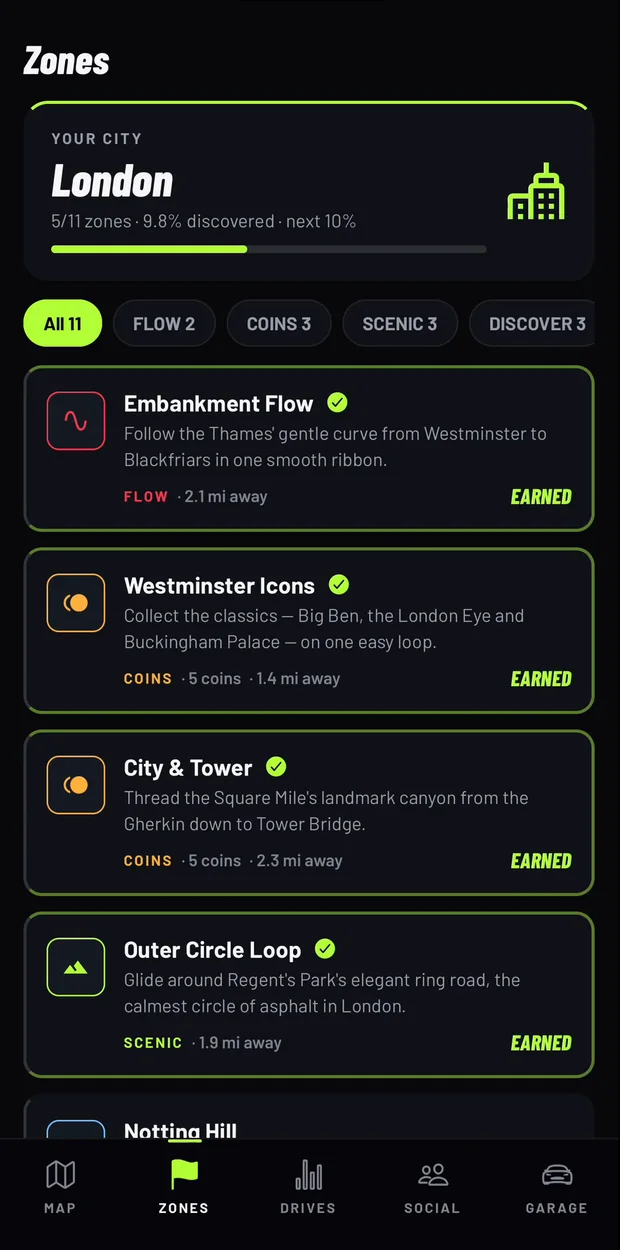
- Use zones as anchors. Discovery zones are built around neighbourhoods worth weaving through, such as Notting Hill in London or Haight-Ashbury in San Francisco.
- Go at quiet times: weekend mornings are easier than rush hour, and easier on residents than late at night.
- Let a passenger handle the phone. If someone else is driving, passenger mode paints the map without scoring flow.
Step 4: Accept what you will not finish
Every city has streets you should not drive: private roads, gated estates, access-only lanes, closed roads and pedestrian zones. Some dead ends are not worth the three-point turn. Skip them. GPS is also imperfect near tall buildings and in tunnels, so a short gap in a painted line does not always mean you missed the street.
Step 5: Make it a crew project
With friends, split the city. Crews pool painted miles on their city's board, and crew chat can drop a pin for a meet point. Agree who takes which area before anyone sets off.
Every-street tools by how you travel
| Tool | Counts | How progress is measured |
|---|---|---|
| OVERDRIVE | Driving (car, motorcycle, scooter, electric, van; passenger mode) | Painted roads on your map; estimated discovery % per city from 250 m squares |
| CityStrides | Running and walking | Street completion; supporter tools such as Node Hunter help find incomplete streets |
| Wandrer | Bike and foot activities | Unique miles of OpenStreetMap roads; % of an area completed |
| Fog of World | Any travel | Fog cleared by area; visit % by country and continent |
OVERDRIVE is free to download and your first two drives are free. After that, OVERDRIVE Pro costs $3.99 a week, $9.99 a month or $34.99 a year in the US (prices vary by country), or a one-time Lifetime purchase ($29.99 until 31 October 2026, then $49.99). The annual and monthly plans include a 3-day free trial for eligible new subscribers; the weekly plan has none. The price and any trial are shown in the app before you pay.
Frequently asked questions
Is there an app to drive every road in my city?
Yes. OVERDRIVE for iPhone paints every road you drive onto your own map, so you can see which streets in your city are still dark, and shows an estimated discovery percentage for 230 cities.
Is there a CityStrides for driving?
CityStrides describes itself as "the best way to Run Every Street" and is built for running and walking. For a car, OVERDRIVE applies the same every-street idea.
Can I see exactly which streets I've missed?
Yes. In OVERDRIVE the roads you have driven are painted and the rest stay dark, so the missing streets are visible on the map.
How long does it take to drive every street in a city?
It depends on the size of the city and how often you drive. Most people should think in months, not weekends, and skip private and access-only roads.
Does it work in small towns?
Roads paint anywhere on earth. The curated zones and the city percentage cover 230 cities; elsewhere OVERDRIVE counts the roughly 1 km areas you have explored.
Is it safe to do an every-street challenge by car?
Plan routes while parked, keep to normal traffic speeds, avoid late-night cruising on residential streets, and never handle the phone while driving. OVERDRIVE needs no taps during a drive and never rewards speed.
How much does OVERDRIVE cost?
OVERDRIVE is free to download and your first two drives are free. After that, OVERDRIVE Pro costs $3.99 a week, $9.99 a month or $34.99 a year in the US (prices vary by country), or a one-time Lifetime purchase ($29.99 until 31 October 2026, then $49.99). The annual and monthly plans include a 3-day free trial for eligible new subscribers; the weekly plan has none. The price and any trial are shown in the app before you pay.
Sources
Checked October 11, 2026. OVERDRIVE facts come from the App Store listing and the app itself (version 2.0.0).
- CityStrides home page: https://citystrides.com/
- CityStrides pricing: https://citystrides.com/pricing
- Wandrer FAQ: https://wandrer.earth/faq
- Fog of World, App Store listing: https://apps.apple.com/us/app/id505367096
- OVERDRIVE on the App Store: https://apps.apple.com/us/app/id6790023849
- OVERDRIVE App Store data (version, ratings, release date): https://itunes.apple.com/lookup?id=6790023849&country=us