An app to drive with friends: convoy, crews and one shared map
Seeing your friends on the map while you drive, filling in the same city from both sides, and the privacy rules that make it safe to switch on.
By OVERDRIVE · Published October 11, 2026 · Facts checked October 11, 2026 · Prices updated October 16, 2026
Short answer: OVERDRIVE (iPhone) lets friends drive together on one map: add each other with a driver code, join a crew that pools painted miles on your city's board, and switch on Convoy to see each other's live position while you drive. Convoy is off by default and is visible only to accepted friends and current crew-mates. It shares while the app is open and, with Background Recording on, during a screen-off drive; otherwise you drop off their map within three minutes of leaving the app. Crew chat can drop a pin for the meet point.
Get OVERDRIVE on the App Store
iPhone only · Free download, first two drives free · Speed is never scored
How it works
- Add friends. Every driver has a code. Share yours, or add a friend's.
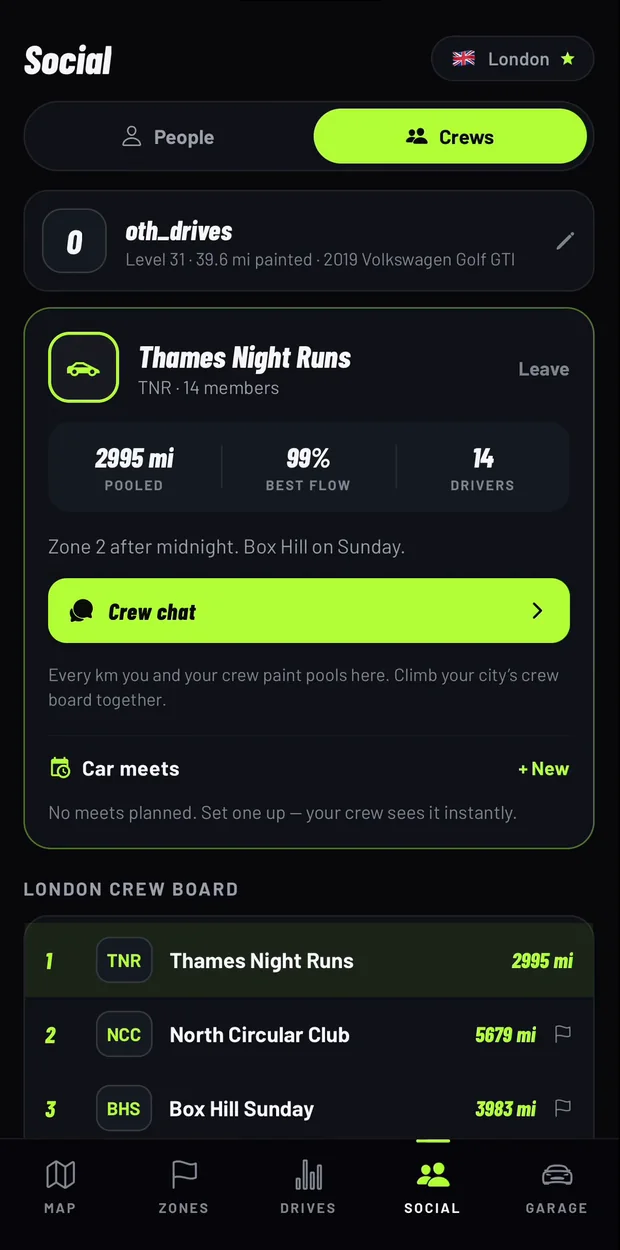
- Join or start a crew. Claim your city and start its crew, or join one. A crew pools the miles its members paint and climbs the city's crew board, which ranks distance, never speed.
- Talk before you go. Crew chat is read by everyone in the crew; direct messages are one to one. You can attach a location pin for the meet point. Hold any message to report or block.
- Switch on Convoy. Each driver who wants to be seen turns it on in Garage. You will see friends who have it on whether or not you share your own position.
- Drive. Everyone's own roads paint onto their own map, and the crew watches the same city fill in from several directions.
Convoy privacy rules
| Question | Answer in OVERDRIVE |
|---|---|
| Is it on by default? | No. It stays off until you switch it on. |
| Who can see me? | Only friends you have accepted and your current crew-mates. Crews are public by default and anyone can join a public crew, so use a private crew if it should only be people you know. |
| When does it share? | While OVERDRIVE is open on screen and, if Background Recording is on, during a drive with the screen off or another app in front, until you end the drive. Otherwise it stops when you leave the app, lock the phone or switch it off. |
| How long does my dot stay? | It disappears from their map by itself within three minutes after sharing stops. |
| Does my driver card show where I am? | No. Profiles show a name, a car and, only if you choose, distance and flow. Never speed, never location. |
Ideas for a crew drive
- Pick a dark part of the city nobody has painted and split it between cars.
- Take on the weekend run together. It is the same objective for every driver worldwide, from Friday 00:00 to Monday 00:00 UTC.
- Choose a scenic or coin zone as the destination and meet at the end for a coffee.
- Compare maps and flow scores after you park, not at the lights.
For more ideas, read driving challenges with friends that do not depend on speed.
Other ways to see friends on a map
If all you need is to see where a friend is, Apple's Find My already lets you share your location for an hour, until the end of the day or indefinitely. Open Road's listing describes friends on one live map and convoy voice chat. OVERDRIVE is for drives you want to turn into a shared map and a crew score; it has no voice chat.
Safety
The driver never needs to touch the phone. Agree the plan and the meet point before you set off, and let passengers read the chat. OVERDRIVE never rewards speed, so there is nothing to gain by racing each other.
OVERDRIVE is free to download and your first two drives are free. After that, OVERDRIVE Pro costs $3.99 a week, $9.99 a month or $34.99 a year in the US (prices vary by country), or a one-time Lifetime purchase ($29.99 until 31 October 2026, then $49.99). The annual and monthly plans include a 3-day free trial for eligible new subscribers; the weekly plan has none. The price and any trial are shown in the app before you pay. Friends, crews, chat and Convoy are part of OVERDRIVE Pro, so each friend needs their own OVERDRIVE Pro (a subscription or a one-time Lifetime purchase) after their first two drives.
Frequently asked questions
Is there an app to see my friends on a live map while we drive?
Yes. OVERDRIVE's Convoy shows friends and crew-mates who have switched it on as live positions on your map, on iPhone. It is off by default.
Can strangers see my location in OVERDRIVE?
Only friends you have accepted and your current crew-mates can see you, and only while you have Convoy switched on. Crews are public by default and anyone can join a public crew, so make your crew private if it should only be people you know.
Does Convoy run in the background?
Only during a drive, and only if you have turned on Background Recording. Convoy shares while OVERDRIVE is open on screen; with Background Recording on, it keeps sharing during a drive with the screen off or another app in front, until you end the drive. Otherwise leaving the app, locking the phone or switching Convoy off stops it, and you drop off friends' maps within three minutes.
Does OVERDRIVE have voice chat?
No. It has crew chat and direct messages with location pins, which passengers can use. Open Road's listing includes convoy voice chat.
Do my friends need to pay?
Friends, crews, chat and Convoy are part of OVERDRIVE Pro. Each driver can try the app with two free drives and then needs their own OVERDRIVE Pro, a subscription or a one-time Lifetime purchase.
What is a crew in OVERDRIVE?
A group of drivers who pool the miles they paint and climb their city's crew board together. The board ranks distance, never speed.
Is OVERDRIVE on Android or CarPlay?
No. OVERDRIVE is an iPhone app (iOS 16.4 or later). There is no Android version and no CarPlay app.
Sources
Checked October 11, 2026. OVERDRIVE facts come from the App Store listing and the app itself (version 2.0.0).
- OVERDRIVE on the App Store: https://apps.apple.com/us/app/id6790023849
- OVERDRIVE App Store data (version, ratings, release date): https://itunes.apple.com/lookup?id=6790023849&country=us
- Open Road: Speed Tracker GPS, App Store listing: https://apps.apple.com/us/app/id6755834573
- Tom's Guide: how to share your location in Find My: https://www.tomsguide.com/how-to/how-to-share-location-on-iphone-using-find-my